Suffix Checker Instructions
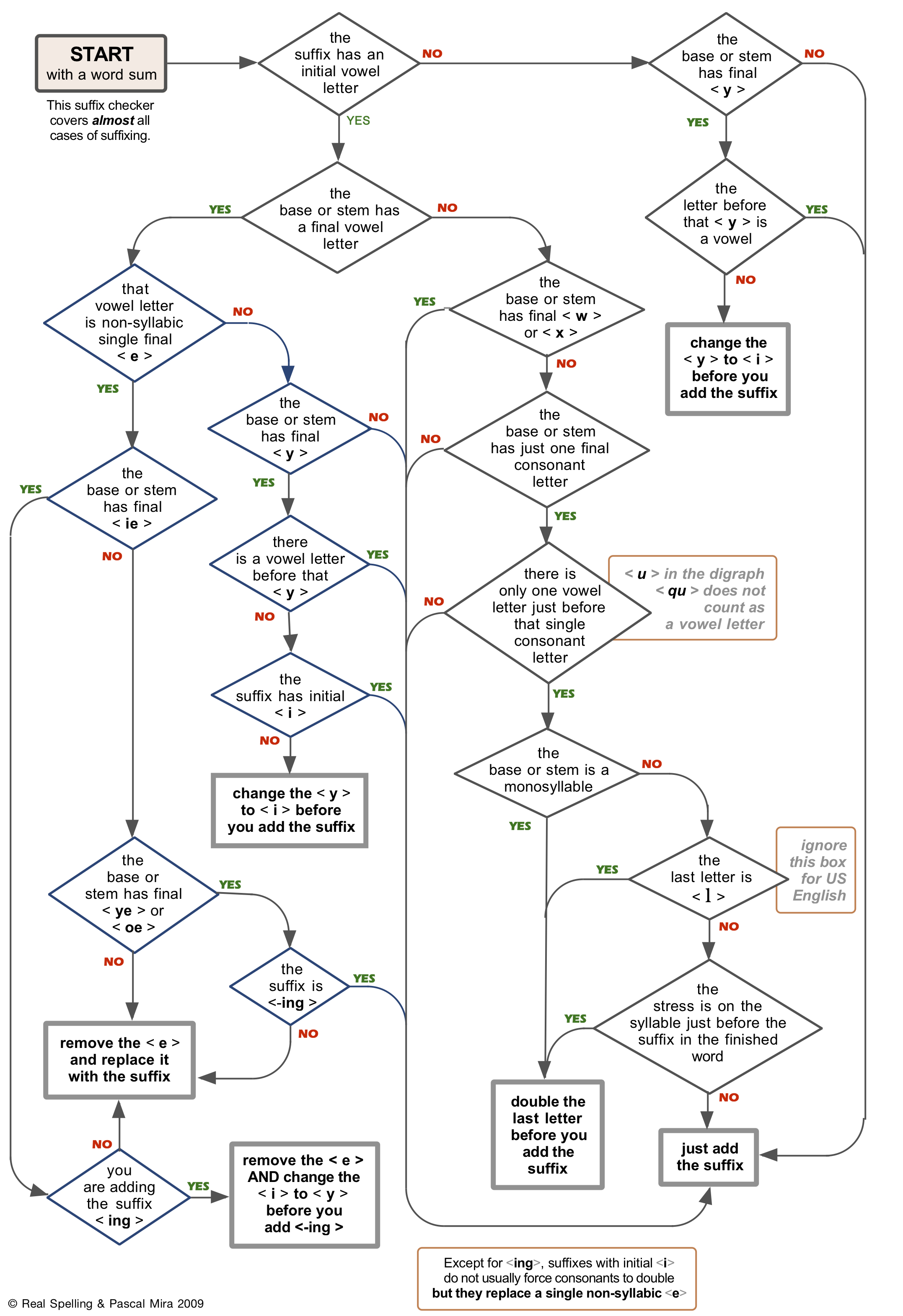
What this tool does: The Suffix Checker helps you investigate changes at selected joins in a word sum. It follows the Suffix Checker flowchart by Real Spelling and Pascal Mira, 2009.
What this tool does not do: It does not find the base, prove the word sum, or decide whether your analysis is correct. Start with a word sum you have already investigated.
1. Enter the word sum
Enter each element of the word sum in its own box. Use the type buttons to identify each element as prefix, base, suffix, or vowel.
Use vowel for a connecting vowel. In the display, connecting vowels appear with hyphens on both sides, such as -i-.
2. Choose the join to investigate
Click the plus sign between the two elements whose join you want to investigate. The selected plus sign marks the join. It does not start the investigation.
The checker only investigates joins involving a suffix. If neither element beside the selected join is marked suffix, the checker will ask you to choose a different join.
3. Start the investigation
Click the green check to begin. The checker will ask one question at a time. Students answer the questions; the tool does not make the spelling decisions for them.
The tool may use the suffix typed in the word sum for routing when that information is already visible, such as whether the suffix is -ing or another suffix with initial i.
4. Follow the questions
Answer each question with Yes or No. The steps appear at the bottom as the investigation proceeds.
Use Back to return to the previous question. Use Start Over to begin the same investigation again.
5. Read the result
The result gives the word sum, the change at the join, and the relevant convention.
The result may tell you to:
- just add the suffix;
- remove a final single non-syllabic -e before adding the suffix;
- change final y to i before adding the suffix;
- double the final consonant letter before adding the suffix;
- handle the special ie + -ing change;
- preserve final ye or oe before -ing.
6. Use the full path when needed
At the end, use Show full path to review the sequence of questions and answers. This is useful for checking a mistake or discussing the reasoning.
7. Watch for further inquiry notes
Sometimes the checker raises a question instead of giving a simple ending. For example, a path may seem to indicate final consonant-letter doubling, but the finished word may not show a doubled consonant. In that case, investigate whether a single final non-syllabic -e may be needed to prevent doubling.
The checker may also raise a further inquiry note when an element appears to end in -v or in -s that is not a plural marker. These notes do not prove the answer. They point to something worth investigating.
8. Investigate another join
After a result, the word sum remains in the builder. Select another plus sign to investigate another join in the same word sum.
 The orthographic content of this site is copyright ©1999-2025 by Real Spelling and Pascal Mira. All rights reserved. Permission to publish their content was granted by Real Spelling to M. Berman in 2019. The content required for the website's operation is copyright ©2019-2025 by M. Berman, all rights reserved. No part of this publication may be reproduced, copied or transmitted in any form or by any means, electronic, mechanical, photocopying, recording or otherwise, except for use by the subscriber's children or classes, without the prior written permission of the publisher or in accordance with the Copyright, Design, and Patents Act 1988. The material on this site is for the exclusive use of the subscribers to the site, and their children and students. Copyright holders are not responsible for your misuse of the English language nor any damages ensuing from that misuse.